Tricks for plug-in development.

Create State Diagram using Open API

tomcat-thumbState Diagram, also call State Machine Diagram is one of the most important diagram in Unified Modeling Language. It helps to visualize the state change of a system, or a particular object in response to various events during the execution of the software. Besides create state diagrams manually, you an also create it programmatically using Open API. In this article we will show you how to create the state diagram with Visual Paradigm’s Open API. Read more
Control Shape Caption Placement using Open API

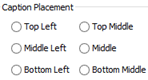
tomcat-thumbWhen creating diagrams sometimes you might want to have the caption not showing in the default location, i.e. to have better layout for the containing elements while not having the name being covered. In this case you may adjust the caption position to reserve space for the child elements. To do this you can specify the caption placement of the individual element via the user interface. But instead of manually specify the caption placement shape by shape, you can also do this via the Open API. In this article we will use Component as sample to demonstrate how to control its caption position with Visual Paradigm’s Open API. Read more

Create Deployment Diagram using Open API

tomcat-thumbDeployment Diagram in Unified Modeling Language is helps to model the physical deployment structure of a software system. It helps to illustrate the structure how the hardware or software components (artifacts) exist in the system and how are they related to each other.. Instead of creating deployment diagram manually, you can also create it programmatically using Open API. In this article we will show you how to create the deployment diagram with Visual Paradigm’s Open API. Read more

Debug your plugins with Eclipse

tomcat-thumbVisual Paradigm Open API provides an interface for developers to develop plugins and extend the functionalities of Visual Paradigm. Plugin development could be time consuming especially during debug phrase since you constantly need to deploy your plugin to Visual Paradigm, even just with slightly changes. Instead of deploy the plugin to VP every time after you made changes, you can directly launch VP with your plugin from Eclipse to perform debugging. This article teaches how to configure Eclipse to perform debugging on your plugins. Read more

Create Component Diagram using Open API

tomcat-thumbComponent Diagram in Unified Modeling Language is helps to model the relationships between various components in a system. It helps to illustrate the structure of arbitrarily complex system. Instead of creating component diagram manually, you can also create it programmatically using Open API. In this article we will show you how to create the component diagram with Visual Paradigm’s Open API. Read more

Generate DDL from ER model using Open API

tomcat-thumbVisual Paradigm’s Open API is a powerful tool which allow user to extend the functionalities of Visual Paradigm software. With Open API you can generate DDL from ER models in your project. The generation of DDL include 4 major steps and this article will explain to you in details. To generate DDL with Open API:

Read more

Adding Elements to Diagram Layers using Open API

tomcat-thumbVisual Paradigm support create diagram with multiple layers. The layer function allow you to assign different shapes into different layers. It help in hiding unnecessary information in your diagram. The layer information can also being access via Open API. In this article we will show you how to work with layers using Open API, including create layers and assign the shapes and connectors in your diagram to different layers. Read more

Retrieve Flow Sequence in Business Process Diagram using Open API

tomcat-thumbVisual Paradigm’s Open API is a powerful tool which allow user to extend the functionalities of Visual Paradigm software. Open API provide full access to the model information within the project, and user can retrieve the diagram and model information in programmatic approach. For most of the case user can obtain the diagram and model information as a collection where the elements are sorted based on the creation order. But in Business Process Diagram there is a special way to retrieve the elements according to their flow order. In this article we will show you how it works. Read more

Create Package Diagram using Open API

tomcat-thumbPackage Diagram in Unified Modeling Language is helps to model the dependency relationships between different packages in your system. It is particularly useful for illustrate the functionality of a system as well as their relationships. Instead of creating package diagram manually, you can also create it programmatically using Open API. In this article we will show you how to create package diagram with Visual Paradigm’s Open API. Read more

Create Class Diagram using Open API

tomcat-thumbClass Diagram from Unified Modeling Language is a typical diagram used to model the structure of a system. Class Diagram is one of the major diagram in object oriented modeling. The classes being modeled in class diagram can become the main objects in your system, describing the interactions of the application as well as the classes needed to be implement. Instead of creating class diagram manually, you can also create it programmatically using Open API. In this article we will show you how to create class diagram with Visual Paradigm’s Open API. Read more