Why I Cannot Publish My Project to My Teamwork Server/VP Online workspace?

Starting from version 17.1 Visual Paradigm Desktop user (Standard Edition or above) can publish their project to the on-premises Teamwork Server/VP Online workspace (a.k.a repository). By default the Project Publisher dialog will show the options for publish the file to repository together with the access control setting.
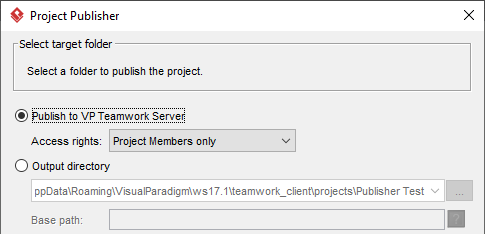
Publish project to repository

Publish project to repository

In case you don’t see those options then very likely is caused by the following reason: Read more

Fix Project Publisher Generate Blurry Diagram Image Problem

When try to output your project with large diagram using Project Publisher you may found it looks blurry. This is because by default Project Publisher will limit the size of the generated diagram image to maximum 4096 x 4096 px. If your diagram is larger than this size then the exported image will being scaled thus making the content looks blurry. To override this default setting:

Read more

Delete custom Doc. Composer Templates

Doc. Composer templates allow user to customize how the model data being generated into documents. For standalone users or team collaboration users with proper permission he can freely make change or create customize templates. In case the template become outdated and wrongly created he can then remove it from repository. In this article we will show you how to remove the Doc. Composer templates in the repository. Read more

Why the class members not being generate to document?

Trying to create custom document template on Class Diagram to output its containing classes and its members but none of the class member being rendered…

No class member being rendered to document

Read more

How to output relationships details using Doc. Composer

Doc. Composer provides an extremely customizable way to query the details of model elements and out put them into Word, PDF and HTML documents. In this article we will teach you how to customize the document templates to output the details of a relationship model. Read more

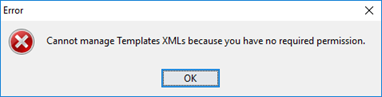
Why I cannot manage my Doc. Composer Templates?

I would like to make change to the Doc. Composer templates but received error complaining on the permission.

Complain on lack of permission to edit Doc. Composer templates

Complain on lack of permission to edit Doc. Composer templates

This is caused by you didn’t have sufficient permission enabled in your VPository. To solve this problem: Read more

Retrieve Referenced Model Element in Doc. Composer

Visual Paradigm support created reference between any model elements or diagrams. This help in elaborate your models without being limited to a specific notations or resources. For example, you can use an Entity table to elaborate the data structure on database of an Actor. Visual Paradigm Doc. Composer allows you to create professional documentation with fully customizable templates. In Doc. Composer you are not limit to retrieve just the reference relationship between models, you can also output the detail information of the referenced elements. In this article we will show you how it works. Read more

Perform Conditional Formatting

It is very often that you would like to emphases particular details in the document which is generated from your model. Thanks to the fully customizable templates in Doc. Composer, you can achieve this by perform conditional formatting based on particular information in your model. In this article we will show you how to define conditional formatting in Doc. Composer templates.

Read more

Report changes between revisions

Starting from version 14.1 you can report the changes between revisions of your project via Doc. Composer. In this article we will demonstrate how to output the changes of your project between the specified revisions in tabular form.

Read more

Defining template for columns in fill-in doc.

Starting from version 14.1 user can specify template for each column when generating Fill-in Doc. This give user more flexibility on constructing tables in Fill-in Doc without creating their own table templates. When defining table in Doc. Base user can specify template in column using ${TEMPLATE notation. Consider you have the following table in your Doc. Base file where you wish to output the name of diagram in first column, and the diagram image in the second column:

Read more
