How to Evaluate Different Editions of VP Products [Obsolete]

During evaluation you may want to try out different editions of the software to see which one fit for your needs. In the old version you can launch the Product Edition Manager to switch the edition of the installed software. Starting from version 10 SP1 release you can do this directly within the application. To switch the edition: Read more

Enhance Font Display on MacBook Pro with Retina Display

User with latest MacBook Pro with Retina display may experience blurry fonts when running Visual Paradigm software.

Standard display (left) and Retina display (right)

To enhance the font display: Read more

How to Perform Silent Installation on Visual Paradigm’s Product (Archived for VP Suite)

Visual Paradigm’s product can be installed in few clicks. But in some situation, say bulk installation, you may not want to install the software one by one through the installer. In this case you can use the silent install mechanism to install the software automatically. This tutorial will teach you how to perform silent installation of VP’s software. Read more

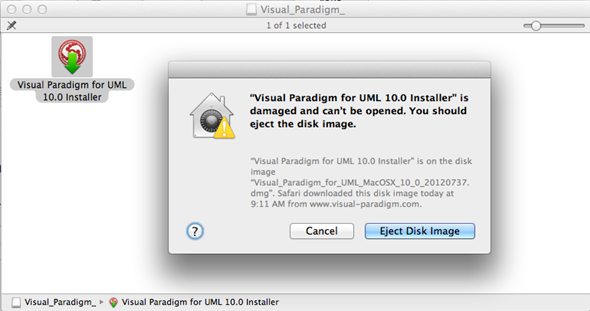
Unable to Launch VP Software Installer on Mountain Lion

User running the latest Mac OS X 10.8 (Mountain Lion) may experience problem that unable to mount the VP’s software installer image.

Warning when mounting VP’s software installer image

Read more

How to Reset Admin Password for VP Server

In the event that the admin password for your existing VP Server is lost and cannot be retrieved, there is a way to reset it. This tutorial will show you how.

For VP Server older than version 5.3, please refer here.

Read more

How to upgrade VP Server (Prior to version 5.3)

With the latest release of VP Server 5.3, you might choose to upgrade from your existing server. To migrate properly, one must follow specific procedures to carry over vital information such as the current repository and user accounts to the new server.

This tutorial will walk you through how to do just that.

Read more

Customize a Logical View to Display Your Own Folder Structure

By default you can navigate your way through a project via default views such as those offered by Diagram Navigator and Model Explorer. While these standard views are readily available at your disposal, sometimes you may want one that is tailored to your specific needs. Read more

Setup VP Teamwork Server on Secure Connection with Self-Signed Certificate

SSL, short for Secure Sockets Layer, is a protocol for enforcing secure communication via the network.  For Visual Paradigm Teamwork Server users, it is possible to setup such a communication between the client and server to protect their works. In this article, we will go through the steps for preparing a certificate that is expected to be known by those users involved, configuration of VP Teamwork Server, and the setup of clients. Read more

When Reversing Java Code to Sequence Diagram, Why Can’t I Select an Operation?

When reversing Java code to sequence diagram, sometimes you may not be able to specify a method for conversion. In the window, somehow the class (to which the method belongs) can’t seem to be expanded to list anything and therefore the method is nowhere to be selected. What happens?

Read more

How to Deploy VP Server to Apache Tomcat as WAR

VP Server is a server package which combines Teamwork Server, Floating License Server, Update Server also ElaborView Server into a single server. The default installation package already bundled with Apache Tomcat. But if you want to deploy it your own Tomcat, you may take the following procedures: Read more
