


How to Deploy VP Server on Docker
VP Server is a key component for collaborative development teams. It serves as both the Teamwork Server (an on-premises deployment of VPository) for team collaboration and the License Server for managing floating licenses. In this tutorial, you’ll learn how to deploy VP Server in a Docker-based Linux environment using MySQL as the backend database.
Prerequisites
Before you begin, ensure that Docker and Docker Compose are installed and running on your target Linux environment.
Deploying VP Server with Docker
- Download the docker-compose.yaml.
- Open the docker-compose.yaml file in a text editor.
- Define a secure password for both MYSQL_ROOT_PASSWORD and MYSQL_PASSWORD. These credentials will be used by the MySQL database and VP Server during setup.
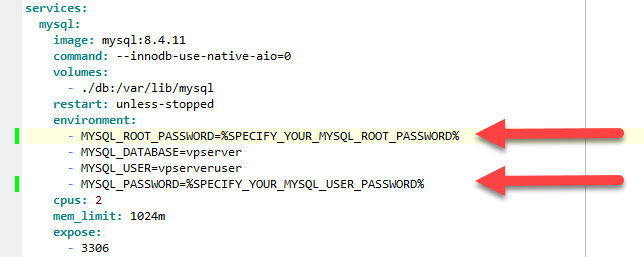
Define password for MySQL Root Account and MySQL User Account
- Connect to your Docker host via SSH.
- Copy the docker-compose.yaml file to your desired deployment directory.
- Navigate to the directory containing the compose file and execute the following command:
docker compose up -d
- Wait for the containers to start successfully.
- Open a web browser and access the VP Server setup page using the following URL:
http://<docker-host>:1999
- Create a password for the Admin account.
- Select the VP Server modules you wish to install.
- When prompted for database configuration:
- Select MySQL as the database type.
- Enter the database host name, port number, database name, username, and password based on the values configured in docker-compose.yaml.
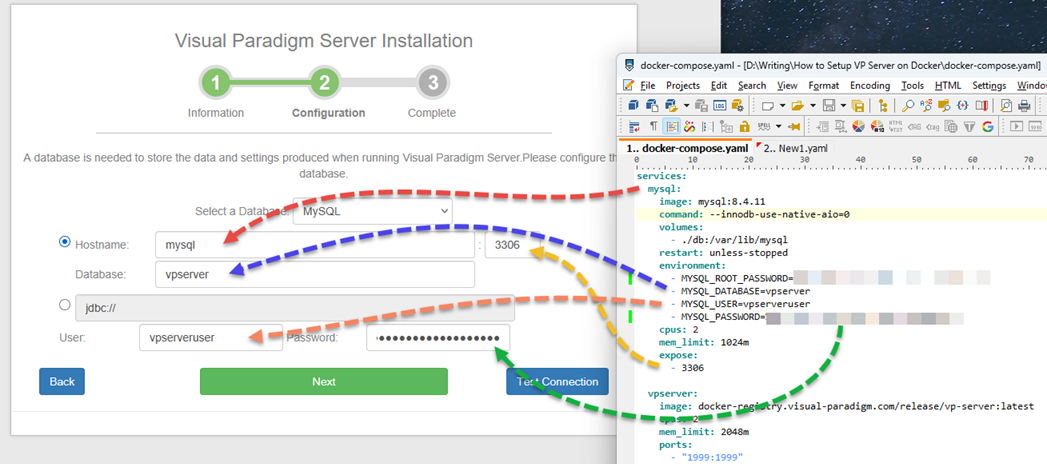
Configure database connection according to docker compose file
- Click Next to proceed with the installation.
Completion
Once the installation wizard finishes, VP Server will be successfully deployed and ready to use in your Docker environment. You can then proceed with repository configuration, user setup, and license management as required.
Related Know-how |
Related Links |


Leave a Reply
Want to join the discussion?Feel free to contribute!