

Launch Visual Paradigm with Specific Diagram Opened
You can open a specific diagram of a Visual Paradigm project through Command Prompt. It would be especially helpful when you need to open one of various diagrams from a project.

You can open a specific diagram of a Visual Paradigm project through Command Prompt. It would be especially helpful when you need to open one of various diagrams from a project.
| Since version 14.0 ArchiMetric had been replaced by Visual Paradigm Enterprise. |
 ArchiMetric (former Visual Paradigm Enterprise Edition) is an all-in-one software and system development tool for end-to-end information technology system modeling. As 64 bit system already become the majority player, ArchiMetric only offer installation package for 64 bit systems. But even 32 bit installation package is not available for ArchiMetric, you can still run the ArchiMetric in 32 bit environment. This article will teach you how to run ArchiMetric in 32 bit environment. Read more
From time to time, Visual Paradigm releases new version to Visual Paradigm and VPository (Teamwork Server on the cloud) which cover bunch of new features and enhancements. Thanks to the maintenance contract system, you can upgrade to new version without extra cost as long as your license is covered by maintenance. This article will teach you how to upgrade your Visual Paradigm in single seat license as well as the VPository to new version.
Read more
From time to time Visual Paradigm release new version of Visual Paradigm and VPository (Teamwork Server on the cloud) which cover bunch of new features and enhancements. Thanks to the maintenance contract system, you can upgrade to new version without extra cost as long as your license is covered by maintenance. This article will teach you how to upgrade your Visual Paradigm in floating license as well as the VPository to new version. Read more
From time to time Visual Paradigm release new version of Visual Paradigm and VPository (Teamwork Server on the cloud) which cover bunch of new features and enhancements. As a subscription user, you can upgrade to new version without extra cost all the way through your subscription period. This article will teach you how to upgrade your Visual Paradigm in subscription license and your VPository to new version.
Read more
 Having unique ID for your model elements are extremely useful in structure of your models in systematic way, also ease the communications with your teams. Visual Paradigm support generate unique ID for all model elements. Once configured, unique ID will be assigned to the model element upon creation. But during your development process the ID of your model elements could become cluttered (i.e. model elements being deleted) and the ID no longer generated in sequence. To solve this problem you can reset the ID of your model elements as well as the index in the ID generator. Read more
Visual Paradigm license subscription service allows users to rent and use Visual Paradigm/ArchiMetric on monthly basis. By default the license subscription will be settle with automatic recurring payment with your credit card in order to keep it alive. You can stop the recurring payment and switch back to manual payment mode from your Customer Service Center account. Read more
| Since version 14.0 ArchiMetric had been replaced by Visual Paradigm Enterprise. |
 ArchiMetric (former Visual Paradigm Enterprise Edition) is an all-in-one software and system development tool for end-to-end information technology system modeling. ArchiMetric comes with all the essential tools you need for Enterprise Architecture, such as ArchiMate, Zachman Framework, Business Process Model and Notation (BPMN), UML and more…. Similar to Visual Paradigm the ArchiMetric also support integrate with various IDE and allow you to perform requirement capturing, analysis and design as well as development within a single environment. But since the IDE integration is not the primary goal for enterprise architecture modeling users, the IDE integration menu is somehow a little bit hidden. Read more
Keeping your Visual Paradigm product upgraded means keeping your work up-to-date, because every new version brings tons of powerful features — including AI-powered capabilities — all designed to boost your productivity and the quality of your work.
To keep your Visual Paradigm product up-to-date, ensure your software maintenance contract is active. During the software maintenance period, you can upgrade to the latest versions at no additional cost, regardless of how many releases occur. Active maintenance is also required to continue using any AI-powered features, as they involve ongoing running costs. Note that renewing active maintenance is cheaper than reinstating expired maintenance.
Extending or purchasing software maintenance can be done in the Customer Service Center. This article will guide you on how to renew your maintenance step by step.
Don’t panic if you see the error message during upgrade of your Visual Paradigm to version 13.0.
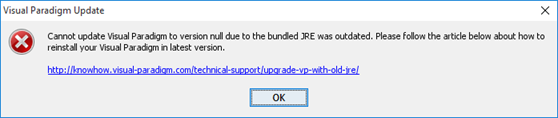
Unable to upgrade to version 13.0
This problem is caused by your Visual Paradigm client was upgraded form very old version and by that time it was using JRE 1.6 as the runtime. For long time ago Visual Paradigm already changed to bundle JRE 1.7 (and JRE 1.8 for Mac). Unfortunately the Visual Paradigm Update can only help to update VP software itself, but not the runtime. To deliver better features some libraries used by Visual Paradigm was upgraded in version 13.0. Unfortunately they are not compatible with the old JRE 1.6. For user experienced this problem can follow the steps below to reinstall your Visual Paradigm to version 13.0. Read more
