Updating your Visual Paradigm software on Mac
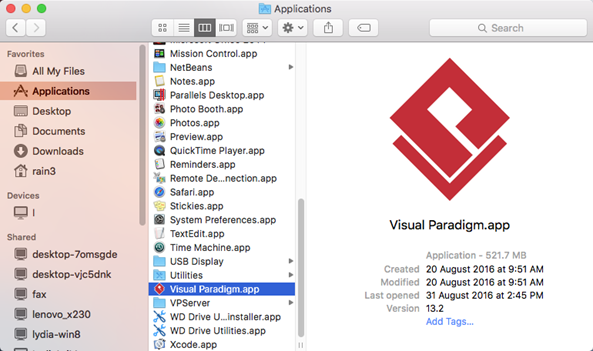
Starting from version 13.2 Visual Paradigm had improved the installer for Mac platform and now support installing the software by drag & drop the App into Applications folder.
When you fail to install your application on Linux, it is because the installer you downloaded doesn’t fit with your OS. For instance, you are using 64 bits Linux, but you installed 32 bits installer. You will probably see the following screenshot that shows you fail to install the application:
Visual Paradigm can be installed via Visual Paradigm’s installer in few clicks. But in some situation, say bulk installation, you may not want to install the software one by one through the installer. In this case you can use the silent install mechanism to install the software automatically. This article will teach you how to perform silent installation of Visual Paradigm. Read more
Floating license enables users to share the Visual Paradigm concurrently based on the limit of concurrent access specified on the floating license. In order to access the floating license, you need to install the VP Server and enable its Floating License Server Module in your Local Area Network in advance. This article will demonstrate how to download, install and configure VP Server and enable the Floating License Server module on Mac environment.
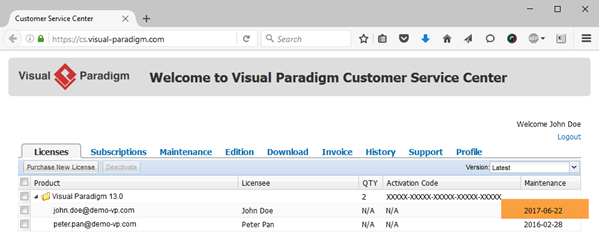
If your Visual Paradigm license is covered by active maintenance, you will be eligible for an upgrade to the latest version. But sometimes, you may find your license remains not upgraded even though the maintenance is active. Why is it so?
If you found that the Visual Paradigm software package you just downloaded cannot be executed, this could be caused by the file you downloaded was incomplete or corrupted. Visual Paradigm offer MD5 and sha256 checksum to the software packages. With the checksum you can make sure the software package you downloaded is genuine, corrupt-free and safe to use.
Visual Paradigm Community Edition is a FREE CASE tool for you to create professional-look diagrams in Unified Modeling Language (UML). It is a strip down version of the full Visual Paradigm package. The Community Edition is a good starting point for learning how to UML diagrams. As you get familiar with the software you may interested in other advanced features from the full Visual Paradigm package. Instead of reinstall the software with the evaluation version to try out those features, you can simply turn your Community Edition into evaluation version of the full Visual Paradigm in few clicks.
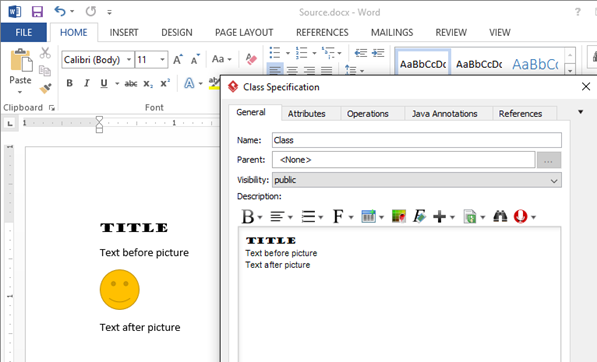
Every diagram and model element in Visual Paradigm support defining description in rich text. Sometimes you may need to fill in the detail description of the diagram or model element by copy & paste form other sources, where your existing MS Word document is one of the typical source. But in some case the image in your Word document may not being copied to Visual Paradigm…
With Visual Paradigm you can model the structure of your database using Entity Relationship Diagram (ERD). When creating ERD you may hit a situation that the data type you wish to pick for your column is not available for you. This probably caused by you haven’t pick the default database for your project. Read more
You may receive error complain fail to download help file for your Visual Paradigm software.