Unable to upgrade VP Server to version 13.0 (or newer)

Some users may experience problem that VP Server fail to run after upgrade to version 13.0, or server remain in its current version after upgrade. This problem is caused by the VP Server is still running with the old JRE1.6. For deliver better features some libraries used by VP Server was being upgraded. Unfortunately they are not compatible with the old JRE 1.6. For users experienced problem on upgrade server can take the following steps to upgrade your server to version 13.0: Read more

Unable to import Enterprise Architect Project

In some environment the import of Enterprise Architect project may refuse to run with the following error.

Unable to import Enterprise Architect project

Unable to import Enterprise Architect project

Read more

How to reset Visual Paradigm Subscription password

Visual Paradigm’s product subscription plan allows user to rent and use Visual Paradigm on monthly basis. By joining the subscription plan user will receive a long ID and password for online activate the software. In case you have loss your password you can reset it with the following ways. Read more

Showing newly added class members/entity columns to other views

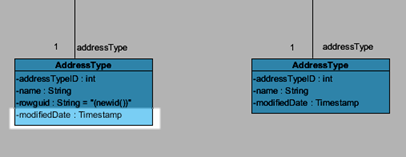
Visual Paradigm project is running in model repository basis, where a model element in the project can presented in different diagrams, we call each of its presentation as a view. Making changes on one of the view will automatically reflect to other views in your project.

Member not showing in all views

Member not showing in all views

Read more

How to Downgrade Visual Paradigm Project File to Older Version

Once you saved your old version project in new version software, you can no longer open it in the old version software. Similarly, the project you created by new version software will not be able to open by older version software. However, in case you want to open new version project in older version software, we will provide two possible ways to downgrade your project file to older version in the following paragraphs.

Read more

Changing the IDE for your VP IDE Integration

Visual Paradigm not just can run as a standalone modeling software, but also can embedded into your favorite IDE via Visual Paradigm IDE Integration, including Eclipse, NetBeans, IntelliJ IDEA, Android Studio as well as Microsoft Visual Studio. You may need to upgrade your IDE from time to time when it got new release, but sometimes you might not want to directly upgrade your IDE software but prefer to have a clean start with the new version by reinstall it. In this article you will learn how to change your existing VP IDE Integration to your new IDE. Read more

How to run VP Server with SSL certificate

VP Server is a critical component for a team since it serve as both Teamwork Server (on-premises setup of VPository) for team collaboration development, as well as the License Server for floating license environment. Thanks for that VP Server was using a standard Apache Tomcat webserver as its base, you can easily protect the communications with VP Server by configure it to run with your own SSL certificate.

Read more

Trigger Plugin with Shortcut Key

When using plugin in Visual Paradigm, the case the plugin action will be registered to the application toolbar and can be accessed via mouse click. Besides trigger the plugin by mouse click, you can also trigger your plugin via shortcut key. Read more

Running Visual Paradigm in Android Studio on MS Windows

tomcat-thumbAndroid Studio is the official IDE for the development of Android applications. It is based on JetBrains IntelliJ IDEA. Starting from Visual Paradigm version 12.2 user can make use of Visual Paradigm IntelliJ IDEA Integration to integrate with Android Studio. But since Android Studio do have some fundamental differences with IntelliJ IDEA, some extra configuration will need in order to run Visual Paradigm in Android Studio on MS Windows (Linux and Mac users can simply integrate VP with Android Studio without extra configuration). This article will teach you how to integrate Visual Paradigm with Android Studio and perform the necessary configurations. Read more

Permission error when perform IDE Integration

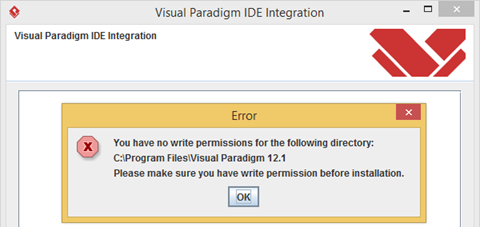
When perform IDE Integration you may receive error complain Visual Paradigm didn’t have sufficient permission for perform the integration.

No permission to perform IDE Integration

No permission to perform IDE Integration

Read more