Permission Error on Perform Software Update (UP0001)
When perform software update you may receive error complain didn’t have sufficient permission to perform software update.
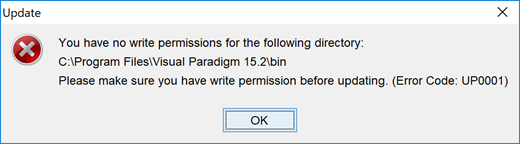
No permission to perform software update

When perform software update you may receive error complain didn’t have sufficient permission to perform software update.
No permission to perform software update
When working with a large scale project with numerous diagrams, there may be some performance difference. It is only natural as huge projects impose more demanding resource allocation. Fortunately, Visual Paradigm offers ways to gear up for better accommodation. Basically, there are 3 practices we would recommend:
For details, please visit Performance tune up for your large project.
On the note of resource allocation, some tasks are more memory-intensive than others, such as document generation which needs to process most of the elements (if not all) within your project. The default memory size is set for popular computer configurations but can be increased to speed up the process when needed.
Layout of diagram is a resource intensive action. By default Visual Paradigm set the limit to handle maximum 300 connectors in single diagram when perform layout. If your diagram got more than 300 connectors then the following message will be shown when you try to perform layout.

Layout diagram hitting maximum number of connector limit
 Changing product edition is particularly necessary when you want to test the functionalities supported by different editions of Visual Paradigm during evaluation period, or reserve license in particular edition for your teammate when running in floating license environment. This article will show you how to switch the edition of your Visual Paradigm software. Read more
Starting from Visual Paradigm 15.2, a new work item authoring mechanism has been introduced, which makes the entire authoring process more seamless and effortless. It is recommended that users who upgraded from earlier versions start using the new Work Item Composer for authoring. Below we will walk you through the details.
Some Mac users may experience problem on unable to enter non-English characters into story map. To solve this problem:
VP Server using database plus file system to store its configuration data and model information (for Teamwork Server user). VP Server can be configure to run with embedded database, or using external database such as MySQL, Maria DB, SQL Server, Oracle and PostgreSQL. In case VP Server is configured to run with external database and the connection info need to be changed, i.e. change to a new password due to password policy, user can follow the steps below to alter database connection info for their VP Server. Read more
VP Server is a central repository for provide various service to user performing team collaboration development. VP Server using a database plus file system to store its data. The following article explains how user can rename the VP Server database if their VP Server is configured to run with external database (SQL Server, Maria DB, SQL Server and PostgreSQL).
Some user got the complaint from their Mac OS X 10.14 Mojave that the Visual Paradigm installation file they just downloaded was being damaged.

Error on install Visual Paradigm on OS X 10.14