Tricks for plug-in development.

Changing Background Color of Class Attributes using Open API

In class diagram the background color can apply to the entire class, or apply to individual class member. In this article we will demonstrate how to control the background color setting of class attributes in your activate diagram using Visual Paradigm Open API. Read more

Changing connector styles using Open API

Visual Paradigm support diagramming with various connector styles. In this article we will show you how to change the style of a connector using Open API. We will use class diagram and association as example to demonstrate how to change the connector style. Read more

Create Class Diagram using Open API

tomcat-thumbClass Diagram from Unified Modeling Language is a typical diagram used to model the structure of a system. Class Diagram is one of the major diagram in object oriented modeling. The classes being modeled in class diagram can become the main objects in your system, describing the interactions of the application as well as the classes needed to be implement. Instead of creating class diagram manually, you can also create it programmatically using Open API. In this article we will show you how to create class diagram with Visual Paradigm’s Open API. Read more

Layout diagram using Open API

Visual Paradigm bundled with auto-layout engine which help user to perform auto layout to their diagrams. The auto-layout can triggered via user interface as well as via Open API. In this article we will teach you how to layout your diagram via Open API. Read more

Control background color of shape using Open API

tomcat-thumbWhen creating diagram sometimes you might want to have shapes showing different background color. To do this you can specify the background color of individual elements one by one. But instead of manually specify the background color shape by shape, you can also do this via Open API. In this article we will demonstrate how to control the background color setting of elements in your active diagram using Visual Paradigm Open API. Read more
Replace Model Element with Open API

In Visual Paradigm the models you created are in repository basis, where a single model element can appear on multiple diagrams, or even multiple occurrence in a single diagram. Each occurrence (we call the view) on diagram is a visual presentation of the model element. In some case you might want to change the underlying model element of a view to another model element without affecting the diagram. In this article we will show you how to change the underlying model element of a view using Open API. Read more

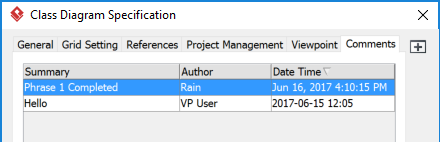
Understanding date time format of comment

When inserting comment to diagram/model element via Open API the date & time look different to those created from GUI.

Comment generated by Open API showing different date time format

Read more

Changing Order of Child Elements using Open API

tomcat-thumbThe Model Explorer is the place which showing entire model collection in your project as well as their structures. Visual Paradigm provide different ways for present the elements in Model Explore by using different sorting algorithms. But even the best sorting algorithms sometimes may not fit you need. In this case you may need to manually order the elements in the order you like. With Open API you can do this programmatically by creating a plugin. In this article we will show you how to change the order of child elements in the selected parent model element. Read more

How to Create Connectors with Turning Points using Open API

Visual Paradigm’s Open API allows you to create all kind of our supported connectors in diagram. They are not necessary to be in simple straight line form. You can create complex connectors with multiple turning points just like those you created in diagram with your mouse. This article will teach you how to create connectors with turning points using Open API. Read more

Create and Access Logical View via API

Open API not only allows you access the model data within the project, but also create and access the Logical View in your project. This article will show you how to create Logical View using Open API. Read more